Iress product manager Matthew Townsend recently jumped onto Advisely to answer all your burning task management questions.
Here are four of the most interesting conversations that came out of his AMA:
I couldn't agree more with you when you say they can make a real difference to a business.
You can find all your workflow (Threads/Cases) templates by searching for
'Threads' in the navigation – it will be the first result that appears under Global – or by navigating to Admin > Site > Templates > Tasks & Thread template > Threads.
I'm not going to say there's not a learning curve because there is, but we see practices big and small creating and updating their own workflows without the need to hire others so it's definitely achievable – the deciding factor might be whether you have the time or not. Editing existing workflows can be a simple way to start.
Keep in mind you can also export your templates (use the action menu dropdown next to each template) so you have a backup and remove some of the risk.
If you want to start from scratch my main tip would be to pick a simpler workflow or process, build that out, get your automations and then tackle some of the more complex ones.
If you want to learn more there are a number of webinars and courses on the Iress Learning Centre that can help. This one can be a good starting place.
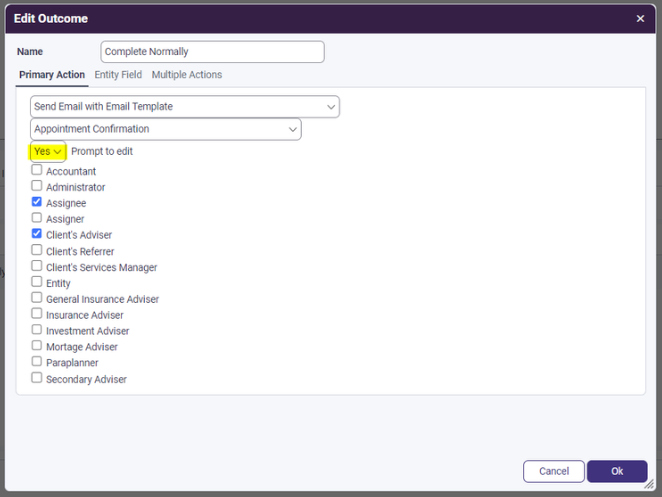
This is a great use of the automation and to answer your question - yes you can. when setting up the outcome and selecting to send email or sms from a template you have an option labelled 'prompt to edit', if you set this to yes, you will get the email loaded up in the Xplan email editor and can review/update before sending (managed to include a pic below).
Unfortunately, that filter is not there yet. Tasks has a number of filters and we started by introducing the most used and requested one but we are getting more feedback for this filter and are looking to see when we might be able to bring this one over into the new experience.
Good question and I'm sure other clients would be in the same boat. There are a number of resources on the Iress Learning Centre that can help get you started with a view to understanding and building your own - they aren't all labelled best practice though. As an example, this one for an ongoing review process I've heard before was helpful.
Probably one of the best all-round workflow overviews I have seen was from @jessica.lamb and you can find the session she did on this over on YouTube here.
In the workflow research we heard a number of clients interested in something like this or we heard of friction points that could perhaps be solved by visualising the workflow. In my view there are 2 elements to it as you kind of alluded to:
- Visualising the workflow: so you can quickly see and understand the flow of the process, where you are at, what comes next etc. We would be aiming to include something like this when we look at moderning the workflow layers in Xplan. It then could be incorporated back into Tasks so you can find out where you are at and see that whole process right when you need it.
- Building workflow: Possibly, this one we see coming later and we also think there are a number of ways you could go about solving this - a kind of drag-and-drop flowchart may be one way, but there could be others which we'd need to explore but still a ways away at this stage.
So in short, yes something like this is part of our future thinking for workflows at least in terms of helping view and follow them 


